
SyncMate Expert 8.8.539 for Mac is a powerful synchronization tool designed specifically for macOS users. It allows seamless syncing of data between your Mac and multiple devices, including Android, iOS, other Macs, and even cloud services like Google and Dropbox. With a user-friendly interface, SyncMate supports synchronization of contacts, calendars, messages, media files, and more, making it a versatile solution for both personal and professional use.
The Expert edition unlocks advanced features such as automatic syncing, full folder sync, and access to SMS and call history. Version 8.8.539 ensures enhanced stability, compatibility with the latest macOS, and improved performance.
Key Features of SyncMate Expert 8.8.539
Broad Device Compatibility
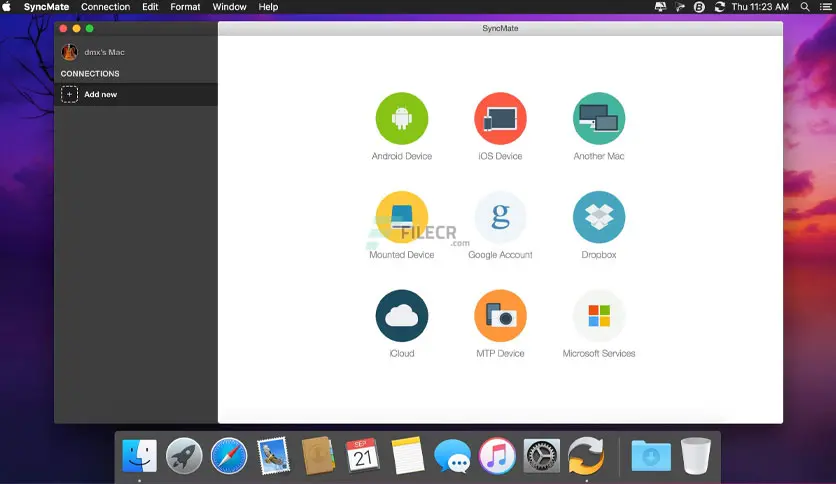
One of the most remarkable aspects of SyncMate Expert 8.8.539 is its broad compatibility. Unlike many Mac applications that restrict users to Apple’s ecosystem, SyncMate bridges the gap. It supports:
- Android devices: Easily sync contacts, calendars, music, videos, SMS, and more.
- iOS devices: Even though Macs are Apple products, SyncMate adds layers of customization and flexibility for syncing iOS content.
- Mounted storage devices: External drives, USB sticks, and other mounted devices are supported for file syncing.
- Cloud services: Connect with Google Drive, Dropbox, iCloud, and more.
- Microsoft services: Sync with Outlook, Office 365, and OneDrive without hassle.
This makes it an ideal solution for users who work across multiple platforms or frequently switch between different operating systems.
Two-Way Synchronization
SyncMate Expert 8.8.539 allows two-way synchronization, which means you can both send and receive data between your Mac and other devices. This ensures that all changes made on either end are reflected across all connected platforms, minimizing the risk of data loss or duplication.
This bidirectional capability is handy for:
- Business professionals needing up-to-date calendars
- Creatives syncing multimedia files
- Remote teams sharing folders or documents
- Users with both Android and Apple devices
Automation and Scheduling
Another standout feature is the ability to automate synchronization. With built-in scheduling tools, users can set up sync intervals—hourly, daily, or weekly—depending on their needs. Once scheduled, SyncMate runs in the background without interrupting your workflow, saving you time and ensuring that your data is always up-to-date.
User-Friendly Interface
Despite its advanced features, SyncMate Expert is remarkably easy to use. The intuitive user interface allows even non-tech-savvy users to quickly set up and manage their synchronization preferences. Whether you’re syncing an entire phone or just selected folders, the drag-and-drop functionality and step-by-step setup process simplify the experience.
What’s New in Version 8.8.539
The 8.8.539 release brings several important updates and bug fixes:
- Improved stability when syncing large volumes of data.
- Enhanced Android support, including newer OS versions and devices.
- Faster sync times thanks to performance optimizations.
- Refined UI elements for a more responsive and modern look.
- Minor bug fixes that improve overall app reliability.
These enhancements make SyncMate Expert 8.8.539 not only more robust but also more efficient, reinforcing its position as a leading synchronization tool for Mac users.
Conclusion
SyncMate Expert 8.8.539 for Mac is a powerful and versatile synchronization tool for users with diverse device ecosystems. With its broad compatibility, two-way sync, automation options, and improved performance, it stands out as a must-have utility for professionals and everyday users alike. If you’re looking for a seamless and hassle-free sync experience on your Mac, SyncMate Expert is the solution you’ve been waiting for.