

Mac OS X Leopard 10.5 was a landmark update in Apple’s Mac operating system lineup. As the sixth major release of Mac OS X, Leopard introduced more than 300 new features, showcasing Apple’s commitment to refining the user experience, improving performance, and bolstering system security. It was also the last version of Mac OS X to support the PowerPC architecture, marking the end of an era.
Leopard was designed to bridge the gap between modern technology and user-friendly design. Its visual polish, under-the-hood enhancements, and developer-friendly tools made it a significant upgrade for both casual users and professionals. From Time Machine to Spaces, Leopard set the stage for the evolution of macOS in the following years.
Key Features and Enhancements
Time Machine – Effortless Backups
One of Leopard’s most groundbreaking features was Time Machine, Apple’s automated backup solution. Time Machine allowed users to back up their entire system—including apps, music, photos, and system files—to an external hard drive. Its intuitive, space-themed interface lets users visually “go back in time” to recover lost files with minimal effort, revolutionizing data protection for the average Mac user.
Spaces – Virtual Desktops
Leopard introduced Spaces, a robust virtual desktop feature that helped users organize their workflow. By enabling multiple desktops for different tasks—such as work, entertainment, and communication—Spaces allowed users to reduce clutter and switch between environments with ease. This feature was handy for multitaskers and developers, enhancing productivity across different projects.
Updated Finder and Cover Flow
The Finder received a significant overhaul in Leopard. It included Cover Flow, a new way to browse files visually using large previews—similar to flipping through album art in iTunes. The Sidebar was also improved for better file navigation, while the new Quick Look feature lets users preview documents, images, and videos without opening them in separate applications.
Security and Performance Improvements
64-bit Support and Improved Kernel
Leopard introduced extensive support for 64-bit applications, allowing developers to create software that could fully leverage modern hardware. This made the OS more future-proof and capable of handling larger memory loads and more powerful processing tasks. The updated kernel architecture improved system stability and speed, benefiting both casual users and power users alike.
Enhanced Parental Controls and Firewall
With increasing concerns about online safety, Leopard expanded its Parental Controls, offering more options for restricting access to web content, apps, and communication. The application firewall was also improved, allowing users to manage which apps could receive incoming network connections, enhancing the overall security of the system.
Developer Tools and Interface Evolution
Core Animation and Xcode 3
Leopard provided developers with new tools, including Core Animation, which allowed for richer user interfaces with minimal coding. This paved the way for more fluid and visually engaging applications. Bundled with Leopard, Xcode 3 offered enhanced development capabilities and integrated debugging tools, supporting the growth of the Mac software ecosystem.
Aesthetic and UI Upgrades
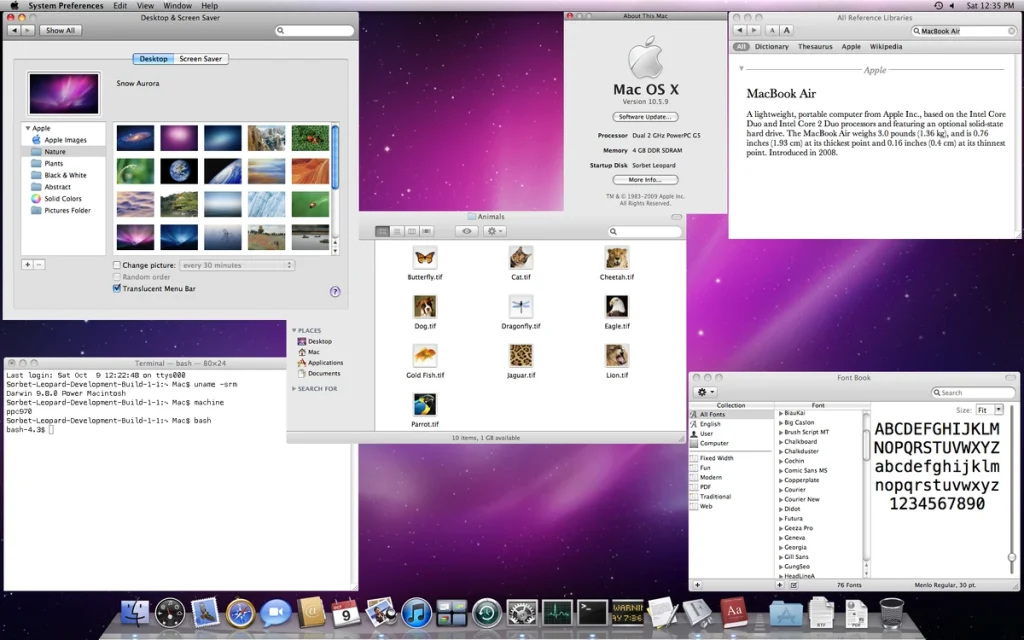
Leopard introduced a more refined interface visually, including a translucent menu bar, a consistent Dock with a new 3D look, and updated system icons. These enhancements not only made the OS more visually appealing but also aligned with Apple’s design philosophy of simplicity and elegance.
Conclusion
Mac OS X Leopard 10.5 was a pivotal release that modernized the Mac experience with groundbreaking features like Time Machine and Spaces while also strengthening performance, security, and developer support. It stood at the intersection of innovation and practicality, leaving a lasting legacy that influenced future macOS versions. Leopard didn’t just evolve the Mac—it redefined what users could expect from a desktop operating system.