
Geekbench 6.3 for Mac is the latest update to the popular benchmarking tool designed to measure the performance of Mac computers. It offers users an easy and accurate way to test their system’s CPU and GPU capabilities, providing detailed scores that help compare different hardware configurations. With enhanced testing algorithms, Geekbench 6.3 delivers more precise results tailored to modern Mac architectures, including Apple Silicon chips.
This version also introduces improved support for macOS features and optimization for newer Mac models. Whether you’re a developer, tech enthusiast, or casual user, Geekbench 6.3 for Mac is an essential tool for assessing your machine’s performance and ensuring it runs at its best.
What’s New in Geekbench 6.3 for Mac
Geekbench 6.3 introduces several new features and improvements explicitly tailored for the Mac ecosystem. One of the most notable upgrades is the improved CPU benchmarking that better reflects real-world applications. The latest tests simulate everyday tasks such as photo editing, web browsing, and gaming, ensuring that results are more relevant to actual user experiences.
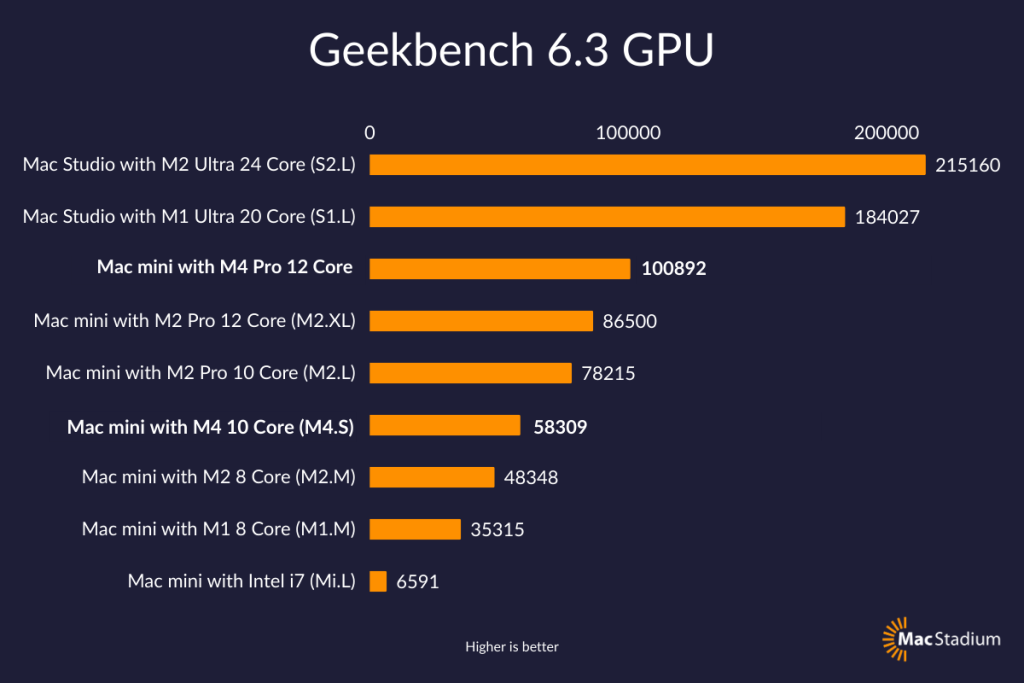
Additionally, Geekbench 6.3 has enhanced GPU benchmarking capabilities, which is crucial for Mac users who rely on their machines for graphics-intensive work such as video editing and 3D rendering. The updated version supports the latest Apple Silicon chips, including the M1 and M2 series, delivering more precise metrics for both integrated and external GPUs. This update allows Mac users to gain a clearer picture of how their hardware performs under various graphical workloads.
Another key improvement is the refined multi-core testing. Mac devices today, especially those powered by Apple Silicon, boast impressive multi-core architectures. Geekbench 6.3 leverages this by offering better multi-threading tests that can push the CPUs to their limits and provide a comprehensive score based on overall throughput. This makes it easier to compare different Mac models or configurations side-by-side.
How to Use Geekbench 6.3 on Mac
Using Geekbench 6.3 on a Mac is straightforward, maintaining the user-friendly approach the software is known for. After downloading and installing the application from the official Primate Labs website or the Mac App Store, users can immediately start benchmarking by clicking the “Run Benchmark” button.
The software performs two primary tests: the CPU benchmark and the Compute benchmark (GPU). The CPU benchmark evaluates single-core and multi-core performance, while the Compute benchmark tests the graphics processing power through OpenCL, CUDA, and Metal frameworks.
Once the tests are completed, Geekbench provides a detailed report with scores for each category. Users can then compare these scores with other Mac models or even Windows PCs through the Geekbench Browser, an online database that collects benchmark results from users worldwide.
Moreover, Geekbench 6.3 offers advanced options for power users, such as custom test settings and exporting results for further analysis. This flexibility makes it a valuable tool not only for casual users but also for professionals who want to fine-tune their Mac’s performance or validate hardware upgrades.

Why Geekbench 6.3 is Important for Mac Users
Benchmarking tools like Geekbench 6.3 play a crucial role in helping Mac users understand their device’s performance in a quantifiable way. With the growing popularity of Apple Silicon Macs, users need reliable tools to compare their machines’ capabilities against previous Intel-based Macs or even other Apple Silicon variants.
Geekbench 6.3 provides this transparency by delivering consistent, repeatable results that help users make informed decisions about upgrading hardware or troubleshooting performance issues. Additionally, developers benefit from Geekbench’s detailed profiling, which helps them optimize their applications to run efficiently on the latest Mac hardware.
For enthusiasts and tech reviewers, Geekbench 6.3 offers an industry-standard benchmarking score that is widely accepted and trusted, making it easier to share and compare data across the community.
Conclusion
Geekbench 6.3 for Mac is a significant upgrade that enhances the accuracy and relevance of benchmarking tests for Apple users. With its focus on modern workloads, support for the latest Apple Silicon chips, and improved GPU testing, it stands out as an indispensable tool for anyone looking to evaluate or optimize their Mac’s performance. Whether you’re a casual user curious about your system’s speed or a professional needing precise performance metrics, Geekbench 6.3 offers an accessible and reliable solution. Keeping your Mac’s capabilities in check has never been more straightforward or more insightful.