

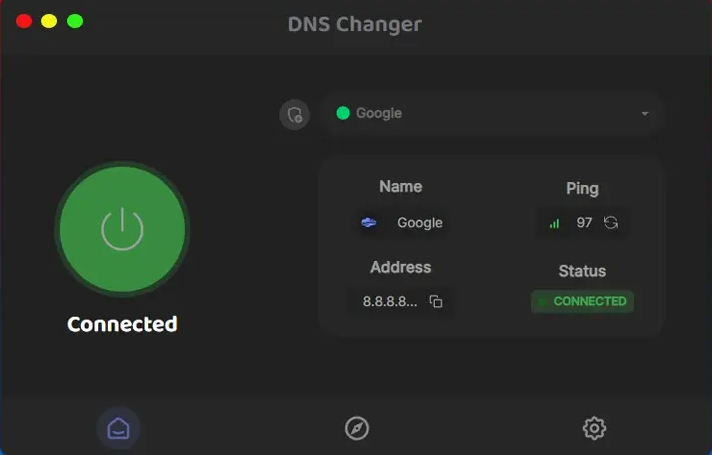
DNS Changer 2.1.12 is a lightweight, user-friendly application designed to help users quickly switch their DNS servers without the need to manually configure network settings. DNS servers translate domain names like into IP addresses, making it possible for devices to access websites. By default, internet service providers (ISPs) assign DNS servers, but these may be slow, unreliable, or censored.
With DNS Changer 2.1.12, users can select from a variety of public DNS servers—such as Google DNS, Cloudflare, or OpenDNS—to potentially speed up their internet connection, bypass regional restrictions, and add an extra layer of security against phishing and malware sites.
Key Features of DNS Changer 2.1.12
- Easy One-Click Switching: The interface allows users to quickly switch between multiple DNS options without needing advanced networking knowledge.
- Preloaded DNS Server List: Comes with a curated list of popular and reliable DNS servers, including options focused on speed, privacy, and security.
- Backup and Restore Functionality: Users can easily save their current DNS settings and restore them, ensuring no permanent changes are made if they want to revert.
- Lightweight and Fast: The program is minimalistic and runs smoothly without consuming significant system resources.
- Compatibility: Supports various Windows versions and works seamlessly across different network types, including home Wi-Fi and corporate networks.
How DNS Changer 2.1.12 Improves Your Internet
Changing your DNS server can have several practical benefits. The DNS Changer 2.1.12 makes this process straightforward, so even non-technical users can enjoy these advantages.
Faster Browsing Speeds
Many default ISP DNS servers are overloaded or inefficient, leading to slower website loading times. By switching to faster DNS providers like Google DNS or Cloudflare, users often experience quicker domain resolution, which results in faster page loads and a smoother browsing experience.
Enhanced Privacy and Security
Some DNS servers offer advanced security features, such as blocking access to malicious websites or filtering out phishing domains. DNS Changer 2.1.12 allows you to easily pick DNS providers that emphasize privacy, such as those that do not log your queries or offer DNS-over-HTTPS (DoH) for encrypted DNS requests.
Bypassing Geo-Restrictions and Censorship
In certain regions, governments or ISPs may block access to specific websites by manipulating DNS responses. By switching to third-party DNS servers, users can often circumvent these restrictions, gaining access to otherwise unavailable content.
How to Use DNS Changer 2.1.12
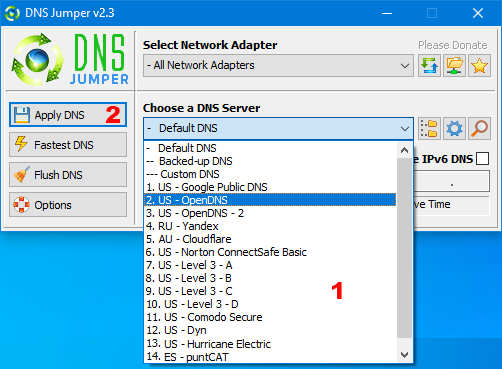
Using DNS Changer 2.1.12 is simple:
- Download and install the software from a trusted source.
- Open the application and choose a DNS server from the list provided.
- Click the “Change DNS” button to apply the new settings.
- Optionally, save your original DNS configuration to restore it later if needed.
- Test your connection by visiting websites or using DNS speed-testing tools.
The program also allows automatic DNS switching based on network changes, which is convenient for users who frequently move between different networks.
Conclusion
DNS Changer 2.1.12 is an excellent tool for anyone looking to optimize their internet connection without hassle. By offering quick access to multiple DNS servers, it empowers users to improve browsing speed, enhance security, and bypass internet restrictions with ease. Whether you are a casual internet user or someone seeking better control over your network settings, DNS Changer 2.1.12 provides a practical and efficient solution for managing DNS settings effectively.